Il y a 389 articles et 19 utilisateurs inscrits (ce bandeau est défini dans MediaWiki:Sitenotice)
« WAF 2026 » : différence entre les versions
| (9 versions intermédiaires par le même utilisateur non affichées) | |||
| Ligne 1 : | Ligne 1 : | ||
[[category:Ansile]][[category:Haproxy]][[category:modsec]] | [[category:Ansile]][[category:Haproxy]][[category:modsec]][[category:coraza]] | ||
== Documentation externe == | == Documentation externe == | ||
Voir Coraza : https://www.coraza.io/ | Voir Coraza : https://www.coraza.io/ | ||
[[category:letsencrypt]] | [[category:letsencrypt]][[category:OPNsense]][[category:opnsens]][[category:opensens]][[category:opensense]] | ||
WAF : Web Application Firewall. | WAF : Web Application Firewall. | ||
| Ligne 48 : | Ligne 48 : | ||
<syntaxhighlight lang="bash">$ DEPLOY_HAPROXY_HOT_UPDATE=yes DEPLOY_HAPROXY_STATS_SOCKET=/var/run/haproxy/admin.sock DEPLOY_HAPROXY_PEM_PATH=/etc/haproxy/certs acme.sh --deploy -d port-dunkerque.pleade.com --deploy-hook haproxy</syntaxhighlight> | <syntaxhighlight lang="bash">$ DEPLOY_HAPROXY_HOT_UPDATE=yes DEPLOY_HAPROXY_STATS_SOCKET=/var/run/haproxy/admin.sock DEPLOY_HAPROXY_PEM_PATH=/etc/haproxy/certs acme.sh --deploy -d port-dunkerque.pleade.com --deploy-hook haproxy</syntaxhighlight> | ||
{{notice|Si, en tant qu'acme, on fait un crontab -l, on peut voir qu'une tâche de renouvellement de certificats tourne régulièrement.}} | {{notice|Si, en tant qu'acme, on fait un crontab -l, on peut voir qu'une tâche de renouvellement de certificats tourne régulièrement.}} | ||
= Certificats automatiques Let's Encrypt via HAProxy = | |||
== Présentation == | |||
Les certificats TLS des domaines publiés par les serveurs HAProxy AJLSM sont gérés avec '''acme.sh''' et '''Let's Encrypt'''. | |||
L'installation et le renouvellement des certificats sont effectués sur deux serveurs : | |||
* '''haproxy-01''' : 10.0.0.30 | |||
* '''haproxy-02''' : 10.0.0.31 | |||
Les certificats sont stockés dans : | |||
<syntaxhighlight lang="text"> | |||
/etc/haproxy/certs/ | |||
</syntaxhighlight> | |||
Le hook ''haproxy'' d'acme.sh permet le déploiement des certificats et leur mise à jour à chaud par le socket d'administration HAProxy. | |||
'''Important :''' | |||
Les opérations doivent être effectuées '''successivement sur HAProxy-01 puis HAProxy-02''', jamais en parallèle. | |||
Chaque serveur possède sa propre installation d'acme.sh et ses propres certificats. Il n'existe pas de synchronisation automatique des fichiers PEM entre les deux serveurs. | |||
== 1. Prérequis == | |||
=== 1.1. Configuration réseau et DNS === | |||
Le domaine doit : | |||
* disposer d'un enregistrement DNS public pointant vers l'adresse IP publique utilisée par l'infrastructure ; | |||
* être acheminé par OPNsense vers la VIP HAProxy '''10.0.0.32''' ; | |||
* être pris en charge par la configuration HAProxy. | |||
La configuration NAT dépend de l'adresse publique concernée. | |||
Pour l'installation de CDF du 5 novembre 2026, le routage utilise '''OPNsense Destination NAT''', et non NAT One-to-One. | |||
'''Attention :''' | |||
Le domaine doit être publié derrière HAProxy. La procédure de validation ACME ne fonctionne pas si les requêtes arrivent directement sur un serveur qui ne dispose pas de la configuration de validation correspondante. | |||
La validation Let's Encrypt utilise le challenge HTTP-01 en mode '''stateless''', sur le port 80. | |||
=== 1.2. Configuration HAProxy avec Ansible === | |||
La configuration HAProxy est maintenue dans le projet Ansible AJLSM. | |||
Voir : [[WAF#Ansible]] | |||
Les éléments nécessaires comprennent : | |||
* le répertoire des certificats <code>/etc/haproxy/certs/</code> ; | |||
* la clé <code>ACCOUNT_THUMBPRINT</code> utilisée pour la validation ACME ; | |||
* la règle HTTP permettant de répondre aux requêtes <code>/.well-known/acme-challenge/</code> ; | |||
* les ACL correspondant au domaine ; | |||
* le backend associé à l'application. | |||
La configuration Ansible doit être déployée et validée avant de demander le certificat. | |||
== 2. Création d'un certificat == | |||
L'exemple suivant concerne le domaine : | |||
<syntaxhighlight lang="text"> | |||
cdf-recette.pleade.com | |||
</syntaxhighlight> | |||
'''Toutes les opérations doivent être réalisées sur HAProxy-01, puis répétées sur HAProxy-02.''' | |||
=== 2.1. S'authentifier en tant qu'acme === | |||
Depuis une session administrateur : | |||
<syntaxhighlight lang="bash"> | |||
sudo -u acme -s | |||
</syntaxhighlight> | |||
'''Important :''' | |||
Les commandes acme.sh doivent être exécutées avec l'utilisateur '''acme''', et non avec root. | |||
=== 2.2. Générer le certificat avec Let's Encrypt === | |||
Toujours dans la session de l'utilisateur <code>acme</code> : | |||
<syntaxhighlight lang="bash"> | |||
acme.sh --issue \ | |||
-d cdf-recette.pleade.com \ | |||
--stateless \ | |||
--server letsencrypt | |||
</syntaxhighlight> | |||
Vérifier que la commande se termine par : | |||
<syntaxhighlight lang="text"> | |||
Success | |||
Cert success. | |||
</syntaxhighlight> | |||
Les fichiers générés sont enregistrés dans : | |||
<syntaxhighlight lang="text"> | |||
/var/lib/acme/.acme.sh/cdf-recette.pleade.com_ecc/ | |||
</syntaxhighlight> | |||
Ce répertoire contient notamment : | |||
* le certificat ; | |||
* la clé privée ; | |||
* le certificat intermédiaire ; | |||
* la chaîne complète. | |||
Ne pas modifier manuellement ces fichiers. | |||
=== 2.3. Déployer le certificat dans HAProxy === | |||
Toujours avec l'utilisateur <code>acme</code> : | |||
<syntaxhighlight lang="bash"> | |||
DEPLOY_HAPROXY_HOT_UPDATE=yes \ | |||
DEPLOY_HAPROXY_STATS_SOCKET=/var/run/haproxy/admin.sock \ | |||
DEPLOY_HAPROXY_PEM_PATH=/etc/haproxy/certs \ | |||
acme.sh --deploy \ | |||
-d cdf-recette.pleade.com \ | |||
--deploy-hook haproxy | |||
</syntaxhighlight> | |||
Cette commande : | |||
# prépare le certificat au format PEM ; | |||
# l'installe dans <code>/etc/haproxy/certs/</code> ; | |||
# demande son chargement à chaud par HAProxy via le socket d'administration. | |||
Lors de l'installation CDF du 5 novembre 2026, le résultat a été : | |||
<syntaxhighlight lang="text"> | |||
Deploying PEM file | |||
Moving new certificate into place | |||
Creating new certificate '/etc/haproxy/certs/cdf-recette.pleade.com.pem' over HAProxy stats socket. | |||
Success | |||
</syntaxhighlight> | |||
Le certificat a donc été émis et son déploiement a réussi. | |||
'''Attention :''' | |||
La réussite du déploiement ne dispense pas de vérifier que HAProxy présente effectivement le nouveau certificat lors d'une connexion HTTPS. | |||
== 3. Vérifications après installation == | |||
=== 3.1. Vérifier la présence du fichier PEM === | |||
Depuis une session administrateur : | |||
<syntaxhighlight lang="bash"> | |||
ls -l /etc/haproxy/certs/cdf-recette.pleade.com.pem | |||
</syntaxhighlight> | |||
Le fichier doit être présent dans le répertoire des certificats HAProxy. | |||
=== 3.2. Vérifier le certificat et ses dates === | |||
<syntaxhighlight lang="bash"> | |||
openssl x509 \ | |||
-in /etc/haproxy/certs/cdf-recette.pleade.com.pem \ | |||
-noout -subject -dates | |||
</syntaxhighlight> | |||
Vérifier : | |||
* le nom du domaine ; | |||
* la date de début de validité ; | |||
* la date d'expiration. | |||
=== 3.3. Tester l'accès HTTPS === | |||
Depuis un poste extérieur : | |||
<syntaxhighlight lang="bash"> | |||
curl -vI --max-time 10 \ | |||
--resolve cdf-recette.pleade.com:443:51.83.117.113 \ | |||
https://cdf-recette.pleade.com/ | |||
</syntaxhighlight> | |||
L'option <code>--resolve</code> permet de forcer l'adresse IP publique et de contourner un éventuel cache DNS obsolète. | |||
'''Ne pas utiliser l'option -k pour le contrôle final.''' | |||
Il faut vérifier que : | |||
* la négociation TLS aboutit ; | |||
* le certificat est reconnu comme valide ; | |||
* le certificat correspond au domaine demandé ; | |||
* le serveur répond avec un code HTTP attendu (200 ou redirection légitime). | |||
'''Attention :''' | |||
Lorsque deux HAProxy partagent une VIP, un test par l'adresse IP publique ne permet pas nécessairement de savoir quel serveur a répondu. | |||
Les deux nœuds doivent donc être contrôlés individuellement. | |||
== 4. Répéter l'installation sur HAProxy-02 == | |||
Après validation de HAProxy-01 : | |||
# se connecter à HAProxy-02 ; | |||
# ouvrir une session sous l'utilisateur <code>acme</code> ; | |||
# exécuter la commande <code>acme.sh --issue</code> ; | |||
# exécuter la commande <code>acme.sh --deploy</code> ; | |||
# vérifier la présence du fichier PEM ; | |||
# vérifier le certificat ; | |||
# contrôler son chargement effectif par HAProxy. | |||
'''Important :''' | |||
Ne jamais considérer l'installation comme terminée tant que le certificat n'a pas été installé et vérifié sur les deux serveurs. | |||
== 5. Renouvellement automatique == | |||
Une tâche cron de l'utilisateur <code>acme</code> exécute régulièrement acme.sh afin de renouveler les certificats arrivant à expiration. | |||
=== 5.1. Vérifier la tâche cron === | |||
Depuis une session administrateur : | |||
<syntaxhighlight lang="bash"> | |||
sudo crontab -u acme -l | |||
</syntaxhighlight> | |||
Sur HAProxy-01, la tâche observée le 5 novembre 2026 est : | |||
<syntaxhighlight lang="text"> | |||
27 19 * * * /usr/local/share/acme.sh/acme.sh --cron --home "/var/lib/acme/.acme.sh" > /dev/null | |||
</syntaxhighlight> | |||
=== 5.2. Lister les certificats gérés === | |||
<syntaxhighlight lang="bash"> | |||
sudo -u acme /usr/local/bin/acme.sh \ | |||
--list \ | |||
--home /var/lib/acme/.acme.sh | |||
</syntaxhighlight> | |||
Vérifier que le nouveau domaine apparaît dans la liste. | |||
=== 5.3. Paramètres du hook HAProxy === | |||
Les paramètres de déploiement sont enregistrés dans la configuration propre au domaine. | |||
Exemple pour Mercure3 : | |||
<syntaxhighlight lang="text"> | |||
Le_DeployHook='haproxy,' | |||
Le_Deploy_haproxy_pem_path='/etc/haproxy/certs' | |||
Le_Deploy_haproxy_hot_update='yes' | |||
</syntaxhighlight> | |||
Ces paramètres permettent à acme.sh de retrouver le mécanisme de déploiement lors des renouvellements. | |||
'''Attention :''' | |||
La présence du hook dans la configuration ne garantit pas à elle seule que le renouvellement et le chargement à chaud aboutiront. | |||
Le renouvellement doit être contrôlé sur les deux HAProxy. | |||
== 6. Points d'attention == | |||
* Toujours intervenir successivement sur HAProxy-01 puis HAProxy-02. | |||
* Toujours exécuter acme.sh avec l'utilisateur <code>acme</code>. | |||
* Ne pas modifier directement les certificats gérés par acme.sh. | |||
* Ne pas confondre émission, déploiement et activation effective du certificat. | |||
* Vérifier le DNS public avant l'émission. | |||
* Vérifier le fonctionnement du challenge HTTP-01 sur le port 80. | |||
* Ne pas modifier le mécanisme de renouvellement existant sans validation. | |||
* Contrôler la validité du certificat sur les deux HAProxy. | |||
* Ne pas supposer qu'un certificat installé sur HAProxy-01 est automatiquement disponible sur HAProxy-02. | |||
== 7. Historique des installations == | |||
=== 5 novembre 2026 — cdf-recette.pleade.com === | |||
{| class="wikitable" | |||
! Élément | |||
! Valeur ou état | |||
|- | |||
| Domaine | |||
| <code>cdf-recette.pleade.com</code> | |||
|- | |||
| IP publique | |||
| <code>51.83.117.113</code> | |||
|- | |||
| VIP HAProxy | |||
| <code>10.0.0.32</code> | |||
|- | |||
| VM applicative | |||
| <code>mercure3 — 10.0.0.43</code> | |||
|- | |||
| Backend HAProxy | |||
| <code>back_mercure3</code> | |||
|- | |||
| Port backend | |||
| <code>80</code> | |||
|- | |||
| Émission Let's Encrypt sur HAProxy-01 | |||
| Réussie | |||
|- | |||
| Déploiement à chaud sur HAProxy-01 | |||
| Réussi | |||
|- | |||
| Contrôle HTTPS | |||
| À effectuer | |||
|- | |||
| Installation sur HAProxy-02 | |||
| À effectuer | |||
|} | |||
La procédure sera considérée comme entièrement validée après les contrôles HTTPS sur les deux serveurs. | |||
== Configuration de HaProxy - Méthode 1 == | == Configuration de HaProxy - Méthode 1 == | ||
| Ligne 507 : | Ligne 828 : | ||
operator: "@rx" | operator: "@rx" | ||
pattern: "^/(archives-en-ligne|pleade)/.*results(\\.html|\\.ajax-html)$" | pattern: "^/(archives-en-ligne|pleade)/.*results(\\.html|\\.ajax-html)$" | ||
actions: "nolog,pass,ctl:ruleRemoveTargetById=942151;ARGS: | actions: "nolog,pass,ctl:ruleRemoveTargetById=942151;ARGS:/^(?:query[0-9]+|fquery[0-9]+)$/" | ||
</syntaxhighlight> | </syntaxhighlight> | ||
| Ligne 526 : | Ligne 847 : | ||
/pleade/custom-results.html | /pleade/custom-results.html | ||
/pleade/functions/ead/custom-results.ajax-html | /pleade/functions/ead/custom-results.ajax-html | ||
</syntaxhighlight> | |||
Ainsi que les motifs suivants : | |||
<syntaxhighlight lang="text"> | |||
ARGS:query1 | |||
ARGS:query2 | |||
ARGS:query3 | |||
ARGS:fquery1 | |||
ARGS:fquery2 | |||
</syntaxhighlight> | </syntaxhighlight> | ||
| Ligne 543 : | Ligne 874 : | ||
Le diff doit montrer : | Le diff doit montrer : | ||
<syntaxhighlight lang=" | <syntaxhighlight lang="apache"> | ||
SecRule REQUEST_FILENAME "@rx ^/(archives-en-ligne|pleade)/.*results(\.html|\.ajax-html)$" \ | SecRule REQUEST_FILENAME "@rx ^/(archives-en-ligne|pleade)/.*results(\.html|\.ajax-html)$" \ | ||
"id:123471,phase:1,nolog,pass,ctl:ruleRemoveTargetById=942151;ARGS: | "id:123471,phase:1,nolog,pass,ctl:ruleRemoveTargetById=942151;ARGS:/^(?:query[0-9]+|fquery[0-9]+)$/" | ||
</syntaxhighlight> | </syntaxhighlight> | ||
| Ligne 674 : | Ligne 1 005 : | ||
</syntaxhighlight> | </syntaxhighlight> | ||
<syntaxhighlight lang="yaml"> | <syntaxhighlight lang="yaml"> | ||
PLAY [Deploy Coraza SPOA WAF] | ansible-playbook -i inventory ./plays/deploy.coraza.yml --limit ajlsm_loadbalancer --diff | ||
PLAY [Deploy Coraza SPOA WAF] *************************************************************************************************************************** | |||
TASK [Gathering Facts] ********************************************************************************************************************************** | TASK [Gathering Facts] ********************************************************************************************************************************** | ||
[WARNING]: Host 'haproxy02.ajlsm.lan' is using the discovered Python interpreter at '/usr/bin/python3.10', but future installation of another Python interpreter could cause a different interpreter to be discovered. See https://docs.ansible.com/ansible-core/2.20/reference_appendices/interpreter_discovery.html for more information. | [WARNING]: Host 'haproxy02.ajlsm.lan' is using the discovered Python interpreter at '/usr/bin/python3.10', but future installation of another Python interpreter could cause a different interpreter to be discovered. See https://docs.ansible.com/ansible-core/2.20/reference_appendices/interpreter_discovery.html for more information. | ||
ok: [haproxy02.ajlsm.lan] | ok: [haproxy02.ajlsm.lan] | ||
[WARNING]: Host 'haproxy01.ajlsm.lan' is using the discovered Python interpreter at '/usr/bin/python3.10', but future installation of another Python interpreter could cause a different interpreter to be discovered. See https://docs.ansible.com/ansible-core/2.20/reference_appendices/interpreter_discovery.html for more information. | |||
ok: [haproxy01.ajlsm.lan] | ok: [haproxy01.ajlsm.lan] | ||
TASK [coraza : Install | TASK [coraza : Install build dependencies] ************************************************************************************************************** | ||
ok: [haproxy02.ajlsm.lan] | ok: [haproxy02.ajlsm.lan] | ||
ok: [haproxy01.ajlsm.lan] | ok: [haproxy01.ajlsm.lan] | ||
TASK [coraza : | TASK [coraza : Install Go via snap] ********************************************************************************************************************* | ||
ok: [haproxy01.ajlsm.lan] | ok: [haproxy01.ajlsm.lan] | ||
ok: [haproxy02.ajlsm.lan] | ok: [haproxy02.ajlsm.lan] | ||
TASK [coraza : | TASK [coraza : Create build directory] ****************************************************************************************************************** | ||
ok: [haproxy02.ajlsm.lan] | |||
ok: [haproxy01.ajlsm.lan] | ok: [haproxy01.ajlsm.lan] | ||
TASK [coraza : Clone coraza-spoa repository] ************************************************************************************************************ | |||
ok: [haproxy02.ajlsm.lan] | ok: [haproxy02.ajlsm.lan] | ||
ok: [haproxy01.ajlsm.lan] | |||
TASK [coraza : Check if coraza-spoa binary already exists] ********************************************************************************************** | TASK [coraza : Check if coraza-spoa binary already exists] ********************************************************************************************** | ||
ok: [haproxy02.ajlsm.lan] | |||
ok: [haproxy01.ajlsm.lan] | ok: [haproxy01.ajlsm.lan] | ||
TASK [coraza : Build coraza-spoa] | TASK [coraza : Build coraza-spoa] *********************************************************************************************************************** | ||
skipping: [haproxy01.ajlsm.lan] | skipping: [haproxy01.ajlsm.lan] | ||
skipping: [haproxy02.ajlsm.lan] | skipping: [haproxy02.ajlsm.lan] | ||
TASK [coraza : Install coraza-spoa binary] | TASK [coraza : Install coraza-spoa binary] ************************************************************************************************************** | ||
skipping: [haproxy01.ajlsm.lan] | skipping: [haproxy01.ajlsm.lan] | ||
skipping: [haproxy02.ajlsm.lan] | skipping: [haproxy02.ajlsm.lan] | ||
TASK [coraza : Create coraza-spoa group] **************************************************************************************************************** | TASK [coraza : Create coraza-spoa group] **************************************************************************************************************** | ||
ok: [haproxy02.ajlsm.lan] | |||
ok: [haproxy01.ajlsm.lan] | ok: [haproxy01.ajlsm.lan] | ||
TASK [coraza : Create coraza-spoa user] | TASK [coraza : Create coraza-spoa user] ***************************************************************************************************************** | ||
ok: [haproxy01.ajlsm.lan] | ok: [haproxy01.ajlsm.lan] | ||
ok: [haproxy02.ajlsm.lan] | ok: [haproxy02.ajlsm.lan] | ||
TASK [coraza : Create configuration directory] | TASK [coraza : Create configuration directory] ********************************************************************************************************** | ||
ok: [haproxy02.ajlsm.lan] | ok: [haproxy02.ajlsm.lan] | ||
ok: [haproxy01.ajlsm.lan] | ok: [haproxy01.ajlsm.lan] | ||
TASK [coraza : Create log directories] ****************************************************************************************************************** | TASK [coraza : Create log directories] ****************************************************************************************************************** | ||
ok: [haproxy01.ajlsm.lan] => (item=/var/log/coraza-spoa) | |||
ok: [haproxy02.ajlsm.lan] => (item=/var/log/coraza-spoa) | ok: [haproxy02.ajlsm.lan] => (item=/var/log/coraza-spoa) | ||
ok: [haproxy02.ajlsm.lan] => (item=/var/log/coraza-spoa/audit) | ok: [haproxy02.ajlsm.lan] => (item=/var/log/coraza-spoa/audit) | ||
ok: [haproxy01.ajlsm.lan] => (item=/var/log/coraza-spoa/audit) | ok: [haproxy01.ajlsm.lan] => (item=/var/log/coraza-spoa/audit) | ||
TASK [coraza : Create log files] | TASK [coraza : Create log files] ************************************************************************************************************************ | ||
ok: [haproxy02.ajlsm.lan] => (item=server.log) | ok: [haproxy02.ajlsm.lan] => (item=server.log) | ||
ok: [haproxy01.ajlsm.lan] => (item=server.log) | ok: [haproxy01.ajlsm.lan] => (item=server.log) | ||
ok: [haproxy01.ajlsm.lan] => (item=error.log) | |||
ok: [haproxy02.ajlsm.lan] => (item=error.log) | ok: [haproxy02.ajlsm.lan] => (item=error.log) | ||
ok: [haproxy01.ajlsm.lan] => (item= | ok: [haproxy01.ajlsm.lan] => (item=audit.log) | ||
ok: [haproxy02.ajlsm.lan] => (item=audit.log) | ok: [haproxy02.ajlsm.lan] => (item=audit.log) | ||
ok: [haproxy01.ajlsm.lan] => (item= | ok: [haproxy01.ajlsm.lan] => (item=debug.log) | ||
ok: [haproxy02.ajlsm.lan] => (item=debug.log) | ok: [haproxy02.ajlsm.lan] => (item=debug.log) | ||
ok: [haproxy01.ajlsm.lan] => (item=coraza-agent.log) | ok: [haproxy01.ajlsm.lan] => (item=coraza-agent.log) | ||
ok: [haproxy02.ajlsm.lan] => (item=coraza-agent.log) | ok: [haproxy02.ajlsm.lan] => (item=coraza-agent.log) | ||
TASK [coraza : Create rollback backup directory] | TASK [coraza : Create rollback backup directory] ******************************************************************************************************** | ||
ok: [haproxy02.ajlsm.lan] | ok: [haproxy02.ajlsm.lan] | ||
ok: [haproxy01.ajlsm.lan] | ok: [haproxy01.ajlsm.lan] | ||
TASK [coraza : Deploy coraza.cfg for HAProxy] *********************************************************************************************************** | TASK [coraza : Deploy coraza.cfg for HAProxy] *********************************************************************************************************** | ||
ok: [haproxy02.ajlsm.lan] | |||
ok: [haproxy01.ajlsm.lan] | ok: [haproxy01.ajlsm.lan] | ||
TASK [coraza : Check if current coraza-spoa config exists] ********************************************************************************************** | |||
ok: [haproxy02.ajlsm.lan] | ok: [haproxy02.ajlsm.lan] | ||
ok: [haproxy01.ajlsm.lan] | |||
TASK [coraza : Check if current | TASK [coraza : Check if current custom rules file exists] *********************************************************************************************** | ||
ok: [haproxy02.ajlsm.lan] | |||
ok: [haproxy01.ajlsm.lan] | ok: [haproxy01.ajlsm.lan] | ||
TASK [coraza : | TASK [coraza : Backup current coraza-spoa config] ******************************************************************************************************* | ||
ok: [haproxy02.ajlsm.lan] | ok: [haproxy02.ajlsm.lan] | ||
ok: [haproxy01.ajlsm.lan] | ok: [haproxy01.ajlsm.lan] | ||
TASK [coraza : Backup current custom rules file] | TASK [coraza : Backup current custom rules file] ******************************************************************************************************** | ||
changed: [haproxy01.ajlsm.lan] | changed: [haproxy01.ajlsm.lan] | ||
changed: [haproxy02.ajlsm.lan] | changed: [haproxy02.ajlsm.lan] | ||
TASK [coraza : Deploy coraza-spoa config.yaml] ********************************************************************************************************** | TASK [coraza : Deploy coraza-spoa config.yaml] ********************************************************************************************************** | ||
ok: [haproxy02.ajlsm.lan] | |||
ok: [haproxy01.ajlsm.lan] | ok: [haproxy01.ajlsm.lan] | ||
TASK [coraza : Create custom rules directory] *********************************************************************************************************** | |||
ok: [haproxy02.ajlsm.lan] | ok: [haproxy02.ajlsm.lan] | ||
ok: [haproxy01.ajlsm.lan] | ok: [haproxy01.ajlsm.lan] | ||
TASK [coraza : Deploy custom rules] | TASK [coraza : Deploy custom rules] ********************************************************************************************************************* | ||
--- before: /etc/coraza-spoa/custom-rules/900-runtime-overrides.conf | --- before: /etc/coraza-spoa/custom-rules/900-runtime-overrides.conf | ||
+++ after: /Users/jlarvers/.ansible/tmp/ansible-local- | +++ after: /Users/jlarvers/.ansible/tmp/ansible-local-20994a3e3jiy7/tmp2vqgd1ck/custom-rules.conf.j2 | ||
@@ - | @@ -47,7 +47,7 @@ | ||
SecRule REQUEST_FILENAME "@rx /full_html?" \ | SecRule REQUEST_FILENAME "@rx /full_html?" \ | ||
"id:123470,phase:1,nolog,pass,ctl:requestBodyAccess=Off" | "id:123470,phase:1,nolog,pass,ctl:requestBodyAccess=Off" | ||
SecRule REQUEST_FILENAME "@rx ^/(archives-en-ligne|pleade)/.*results(\.html|\.ajax-html)$" \ | |||
- "id:123471,phase:1,nolog,pass,ctl:ruleRemoveTargetById=942151;ARGS:fquery1" | |||
+ "id:123471,phase:1,nolog,pass,ctl:ruleRemoveTargetById=942151;ARGS:/^(?:query[0-9]+|fquery[0-9]+)$/" | |||
SecRequestBodyLimit 524288000 | SecRequestBodyLimit 524288000 | ||
SecRequestBodyNoFilesLimit 524288000 | |||
changed: [ | changed: [haproxy02.ajlsm.lan] | ||
--- before: /etc/coraza-spoa/custom-rules/900-runtime-overrides.conf | --- before: /etc/coraza-spoa/custom-rules/900-runtime-overrides.conf | ||
+++ after: /Users/jlarvers/.ansible/tmp/ansible-local- | +++ after: /Users/jlarvers/.ansible/tmp/ansible-local-20994a3e3jiy7/tmpd0a58h10/custom-rules.conf.j2 | ||
@@ - | @@ -47,7 +47,7 @@ | ||
SecRule REQUEST_FILENAME "@rx /full_html?" \ | SecRule REQUEST_FILENAME "@rx /full_html?" \ | ||
"id:123470,phase:1,nolog,pass,ctl:requestBodyAccess=Off" | "id:123470,phase:1,nolog,pass,ctl:requestBodyAccess=Off" | ||
SecRule REQUEST_FILENAME "@rx ^/(archives-en-ligne|pleade)/.*results(\.html|\.ajax-html)$" \ | |||
- "id:123471,phase:1,nolog,pass,ctl:ruleRemoveTargetById=942151;ARGS:fquery1" | |||
+ "id:123471,phase:1,nolog,pass,ctl:ruleRemoveTargetById=942151;ARGS:/^(?:query[0-9]+|fquery[0-9]+)$/" | |||
SecRequestBodyLimit 524288000 | SecRequestBodyLimit 524288000 | ||
SecRequestBodyNoFilesLimit 524288000 | |||
changed: [ | changed: [haproxy01.ajlsm.lan] | ||
TASK [coraza : Remove legacy split custom rules files] | TASK [coraza : Remove legacy split custom rules files] ************************************************************************************************** | ||
ok: [haproxy01.ajlsm.lan] => (item=900-legacy-overrides.conf) | ok: [haproxy01.ajlsm.lan] => (item=900-legacy-overrides.conf) | ||
ok: [haproxy02.ajlsm.lan] => (item=900-legacy-overrides.conf) | ok: [haproxy02.ajlsm.lan] => (item=900-legacy-overrides.conf) | ||
ok: [haproxy01.ajlsm.lan] => (item=900-exclusions.conf) | |||
ok: [haproxy02.ajlsm.lan] => (item=900-exclusions.conf) | ok: [haproxy02.ajlsm.lan] => (item=900-exclusions.conf) | ||
ok: [haproxy01.ajlsm.lan] => (item= | ok: [haproxy01.ajlsm.lan] => (item=910-crs-policy.conf) | ||
ok: [haproxy02.ajlsm.lan] => (item=910-crs-policy.conf) | ok: [haproxy02.ajlsm.lan] => (item=910-crs-policy.conf) | ||
ok: [haproxy01.ajlsm.lan] => (item= | ok: [haproxy01.ajlsm.lan] => (item=920-body-limits.conf) | ||
ok: [haproxy02.ajlsm.lan] => (item=920-body-limits.conf) | ok: [haproxy02.ajlsm.lan] => (item=920-body-limits.conf) | ||
TASK [coraza : Validate coraza-spoa config and custom rules before restart] ***************************************************************************** | TASK [coraza : Validate coraza-spoa config and custom rules before restart] ***************************************************************************** | ||
ok: [haproxy02.ajlsm.lan] | |||
ok: [haproxy01.ajlsm.lan] | ok: [haproxy01.ajlsm.lan] | ||
TASK [coraza : Deploy coraza-spoa systemd unit] ********************************************************************************************************* | |||
ok: [haproxy02.ajlsm.lan] | ok: [haproxy02.ajlsm.lan] | ||
ok: [haproxy01.ajlsm.lan] | |||
TASK [coraza : | TASK [coraza : Enable and start coraza-spoa service] **************************************************************************************************** | ||
ok: [haproxy01.ajlsm.lan] | ok: [haproxy01.ajlsm.lan] | ||
ok: [haproxy02.ajlsm.lan] | ok: [haproxy02.ajlsm.lan] | ||
RUNNING HANDLER [coraza : Restart coraza-spoa] ********************************************************************************************************** | |||
changed: [haproxy01.ajlsm.lan] | |||
changed: [haproxy02.ajlsm.lan] | changed: [haproxy02.ajlsm.lan] | ||
PLAY RECAP | PLAY RECAP ********************************************************************************************************************************************** | ||
haproxy01.ajlsm.lan : ok=25 changed=3 unreachable=0 failed=0 skipped=2 rescued=0 ignored=0 | haproxy01.ajlsm.lan : ok=25 changed=3 unreachable=0 failed=0 skipped=2 rescued=0 ignored=0 | ||
haproxy02.ajlsm.lan : ok=25 changed=3 unreachable=0 failed=0 skipped=2 rescued=0 ignored=0 | haproxy02.ajlsm.lan : ok=25 changed=3 unreachable=0 failed=0 skipped=2 rescued=0 ignored=0 | ||
</syntaxhighlight> | </syntaxhighlight> | ||
Les paramètres suivants puvent être utilisés avec ansible : | |||
{| class="wikitable" | |||
! Option | |||
! Description | |||
! Modifie le serveur | |||
! Affiche les différences | |||
! Usage typique | |||
|- | |||
| aucune option | |||
| Exécution normale du playbook | |||
| Oui | |||
| Non | |||
| Déploiement standard | |||
|- | |||
| --check | |||
| Simulation (dry-run) | |||
| Non | |||
| Non | |||
| Vérifier ce qui serait modifié | |||
|- | |||
| --diff | |||
| Exécution réelle avec affichage des différences | |||
| Oui | |||
| Oui | |||
| Déployer en visualisant les changements | |||
|- | |||
| --check --diff | |||
| Simulation avec affichage des différences | |||
| Non | |||
| Oui | |||
| Vérifier précisément les modifications avant déploiement | |||
|- | |||
| --limit <hôte> | |||
| Limite l'exécution à un ou plusieurs hôtes | |||
| Selon les autres options | |||
| Selon les autres options | |||
| Tester sur un seul serveur | |||
|- | |||
| --tags <tag> | |||
| Exécute uniquement les tâches portant un tag donné | |||
| Selon les autres options | |||
| Selon les autres options | |||
| Déployer uniquement un composant spécifique | |||
|- | |||
| --skip-tags <tag> | |||
| Ignore les tâches portant un tag donné | |||
| Selon les autres options | |||
| Selon les autres options | |||
| Exclure une partie du playbook | |||
|- | |||
| -v | |||
| Mode verbeux | |||
| Selon les autres options | |||
| Selon les autres options | |||
| Voir davantage d'informations | |||
|- | |||
| -vv | |||
| Mode très verbeux | |||
| Selon les autres options | |||
| Selon les autres options | |||
| Débogage | |||
|- | |||
| -vvv | |||
| Mode débogage avancé | |||
| Selon les autres options | |||
| Selon les autres options | |||
| Analyse détaillée des connexions et modules | |||
|} | |||
= Coraza = | = Coraza = | ||
Dernière version du 5 novembre 2026 à 14:32
Documentation externe
[modifier | modifier le wikicode]Voir Coraza : https://www.coraza.io/ WAF : Web Application Firewall.
Description de l'infrastructure
[modifier | modifier le wikicode]Schéma de l'infra
[modifier | modifier le wikicode]Dans notre infra (aujourd'hui Saturne3) et sur Proxmox, on a installé 4 VM.
2 VM Haproxy (en cluster) récupèrent le flux et le renvoi vers 2 VM modsecurity (en cluster) qui analysent et traitent les requêtes et renvoient vers les VM HAPROXY qui renvoient, ou non, vers les VM clients.
- Mise en place de deux nœuds Haproxy redondés via VRRP
- IP 1 : 10.0.0.30,
- IP 2 : 10.0.0.31,
- IP redondée/balancée : 10.0.0.32, IP externe redondée : 51.83.117.120)
- Accès par VPN Wireguard, ou,
- Accès par OpenVPN,
- Utilisateur root.
Ajouts des certificats SSL (manuelle)
[modifier | modifier le wikicode]Rajouter un domaine (un certificat SSL) dans le reverse proxy HAPROXY
[modifier | modifier le wikicode]1 -> Copier le certificat complet (voir où se trouve les certificats dans la conf apache du domaine ...-le-ssl.conf, puis réunir la clé publique et la clé privée en 1 fichier.
Depuis la VM (voir celui de portdunkerque pour exemple) vers les 2 VM HAPROXY, dans /etc/haproxy/certs/ en prenant soin de respecter le nom de domaine, par exemple :
port-dunkerque.pleade.com.pem
Une fois les certificats SSL en place, relancez le service haproxy :
service haproxy reload
Certificats automatiques (SSL Lets Encrypt) via Haproxy
[modifier | modifier le wikicode]Modification du fichier haproxy.yml d'Ansible
[modifier | modifier le wikicode]- Le chemin des certificats change de /etc/haproxy/ssl à /etc/haproxy/certs
- Ajout de la clé ACCOUNT_THUMBPRINT qui gère les challenge acme-challenge
Ajout de certificat sur un nouveau domaine
[modifier | modifier le wikicode]L'exemple ici porte sur port-dunkerque.pleade.com
S'authentifier en tant qu'acme
[modifier | modifier le wikicode]$ sudo -u acme -s /!\ IMPORTANT d'être authentifié en tant qu'acme
Génération des certificats via LetsEncrypt
[modifier | modifier le wikicode]$ acme.sh --issue -d port-dunkerque.pleade.com --stateless --server letsencrypt
Déploiement dans le dossier Haproxy grâce au hook correspondant qui met à jour à chaud les certs
[modifier | modifier le wikicode]$ DEPLOY_HAPROXY_HOT_UPDATE=yes DEPLOY_HAPROXY_STATS_SOCKET=/var/run/haproxy/admin.sock DEPLOY_HAPROXY_PEM_PATH=/etc/haproxy/certs acme.sh --deploy -d port-dunkerque.pleade.com --deploy-hook haproxy
Certificats automatiques Let's Encrypt via HAProxy
[modifier | modifier le wikicode]Présentation
[modifier | modifier le wikicode]Les certificats TLS des domaines publiés par les serveurs HAProxy AJLSM sont gérés avec acme.sh et Let's Encrypt.
L'installation et le renouvellement des certificats sont effectués sur deux serveurs :
- haproxy-01 : 10.0.0.30
- haproxy-02 : 10.0.0.31
Les certificats sont stockés dans :
/etc/haproxy/certs/
Le hook haproxy d'acme.sh permet le déploiement des certificats et leur mise à jour à chaud par le socket d'administration HAProxy.
Important :
Les opérations doivent être effectuées successivement sur HAProxy-01 puis HAProxy-02, jamais en parallèle.
Chaque serveur possède sa propre installation d'acme.sh et ses propres certificats. Il n'existe pas de synchronisation automatique des fichiers PEM entre les deux serveurs.
1. Prérequis
[modifier | modifier le wikicode]1.1. Configuration réseau et DNS
[modifier | modifier le wikicode]Le domaine doit :
- disposer d'un enregistrement DNS public pointant vers l'adresse IP publique utilisée par l'infrastructure ;
- être acheminé par OPNsense vers la VIP HAProxy 10.0.0.32 ;
- être pris en charge par la configuration HAProxy.
La configuration NAT dépend de l'adresse publique concernée.
Pour l'installation de CDF du 5 novembre 2026, le routage utilise OPNsense Destination NAT, et non NAT One-to-One.
Attention :
Le domaine doit être publié derrière HAProxy. La procédure de validation ACME ne fonctionne pas si les requêtes arrivent directement sur un serveur qui ne dispose pas de la configuration de validation correspondante.
La validation Let's Encrypt utilise le challenge HTTP-01 en mode stateless, sur le port 80.
1.2. Configuration HAProxy avec Ansible
[modifier | modifier le wikicode]La configuration HAProxy est maintenue dans le projet Ansible AJLSM.
Voir : WAF#Ansible
Les éléments nécessaires comprennent :
- le répertoire des certificats
/etc/haproxy/certs/; - la clé
ACCOUNT_THUMBPRINTutilisée pour la validation ACME ; - la règle HTTP permettant de répondre aux requêtes
/.well-known/acme-challenge/; - les ACL correspondant au domaine ;
- le backend associé à l'application.
La configuration Ansible doit être déployée et validée avant de demander le certificat.
2. Création d'un certificat
[modifier | modifier le wikicode]L'exemple suivant concerne le domaine :
cdf-recette.pleade.com
Toutes les opérations doivent être réalisées sur HAProxy-01, puis répétées sur HAProxy-02.
2.1. S'authentifier en tant qu'acme
[modifier | modifier le wikicode]Depuis une session administrateur :
sudo -u acme -s
Important :
Les commandes acme.sh doivent être exécutées avec l'utilisateur acme, et non avec root.
2.2. Générer le certificat avec Let's Encrypt
[modifier | modifier le wikicode]Toujours dans la session de l'utilisateur acme :
acme.sh --issue \
  -d cdf-recette.pleade.com \
  --stateless \
  --server letsencrypt
Vérifier que la commande se termine par :
Success
Cert success.
Les fichiers générés sont enregistrés dans :
/var/lib/acme/.acme.sh/cdf-recette.pleade.com_ecc/
Ce répertoire contient notamment :
- le certificat ;
- la clé privée ;
- le certificat intermédiaire ;
- la chaîne complète.
Ne pas modifier manuellement ces fichiers.
2.3. Déployer le certificat dans HAProxy
[modifier | modifier le wikicode]Toujours avec l'utilisateur acme :
DEPLOY_HAPROXY_HOT_UPDATE=yes \
DEPLOY_HAPROXY_STATS_SOCKET=/var/run/haproxy/admin.sock \
DEPLOY_HAPROXY_PEM_PATH=/etc/haproxy/certs \
acme.sh --deploy \
  -d cdf-recette.pleade.com \
  --deploy-hook haproxy
Cette commande :
- prépare le certificat au format PEM ;
- l'installe dans
/etc/haproxy/certs/; - demande son chargement à chaud par HAProxy via le socket d'administration.
Lors de l'installation CDF du 5 novembre 2026, le résultat a été :
Deploying PEM file
Moving new certificate into place
Creating new certificate '/etc/haproxy/certs/cdf-recette.pleade.com.pem' over HAProxy stats socket.
Success
Le certificat a donc été émis et son déploiement a réussi.
Attention :
La réussite du déploiement ne dispense pas de vérifier que HAProxy présente effectivement le nouveau certificat lors d'une connexion HTTPS.
3. Vérifications après installation
[modifier | modifier le wikicode]3.1. Vérifier la présence du fichier PEM
[modifier | modifier le wikicode]Depuis une session administrateur :
ls -l /etc/haproxy/certs/cdf-recette.pleade.com.pem
Le fichier doit être présent dans le répertoire des certificats HAProxy.
3.2. Vérifier le certificat et ses dates
[modifier | modifier le wikicode]openssl x509 \
-in /etc/haproxy/certs/cdf-recette.pleade.com.pem \
-noout -subject -dates
Vérifier :
- le nom du domaine ;
- la date de début de validité ;
- la date d'expiration.
3.3. Tester l'accès HTTPS
[modifier | modifier le wikicode]Depuis un poste extérieur :
curl -vI --max-time 10 \
  --resolve cdf-recette.pleade.com:443:51.83.117.113 \
  https://cdf-recette.pleade.com/
L'option --resolve permet de forcer l'adresse IP publique et de contourner un éventuel cache DNS obsolète.
Ne pas utiliser l'option -k pour le contrôle final.
Il faut vérifier que :
- la négociation TLS aboutit ;
- le certificat est reconnu comme valide ;
- le certificat correspond au domaine demandé ;
- le serveur répond avec un code HTTP attendu (200 ou redirection légitime).
Attention :
Lorsque deux HAProxy partagent une VIP, un test par l'adresse IP publique ne permet pas nécessairement de savoir quel serveur a répondu.
Les deux nœuds doivent donc être contrôlés individuellement.
4. Répéter l'installation sur HAProxy-02
[modifier | modifier le wikicode]Après validation de HAProxy-01 :
- se connecter à HAProxy-02 ;
- ouvrir une session sous l'utilisateur
acme; - exécuter la commande
acme.sh --issue; - exécuter la commande
acme.sh --deploy; - vérifier la présence du fichier PEM ;
- vérifier le certificat ;
- contrôler son chargement effectif par HAProxy.
Important :
Ne jamais considérer l'installation comme terminée tant que le certificat n'a pas été installé et vérifié sur les deux serveurs.
5. Renouvellement automatique
[modifier | modifier le wikicode]Une tâche cron de l'utilisateur acme exécute régulièrement acme.sh afin de renouveler les certificats arrivant à expiration.
5.1. Vérifier la tâche cron
[modifier | modifier le wikicode]Depuis une session administrateur :
sudo crontab -u acme -l
Sur HAProxy-01, la tâche observée le 5 novembre 2026 est :
27 19 * * * /usr/local/share/acme.sh/acme.sh --cron --home "/var/lib/acme/.acme.sh" > /dev/null
5.2. Lister les certificats gérés
[modifier | modifier le wikicode]sudo -u acme /usr/local/bin/acme.sh \
--list \
--home /var/lib/acme/.acme.sh
Vérifier que le nouveau domaine apparaît dans la liste.
5.3. Paramètres du hook HAProxy
[modifier | modifier le wikicode]Les paramètres de déploiement sont enregistrés dans la configuration propre au domaine.
Exemple pour Mercure3 :
Le_DeployHook='haproxy,'
Le_Deploy_haproxy_pem_path='/etc/haproxy/certs'
Le_Deploy_haproxy_hot_update='yes'
Ces paramètres permettent à acme.sh de retrouver le mécanisme de déploiement lors des renouvellements.
Attention :
La présence du hook dans la configuration ne garantit pas à elle seule que le renouvellement et le chargement à chaud aboutiront.
Le renouvellement doit être contrôlé sur les deux HAProxy.
6. Points d'attention
[modifier | modifier le wikicode]- Toujours intervenir successivement sur HAProxy-01 puis HAProxy-02.
- Toujours exécuter acme.sh avec l'utilisateur
acme. - Ne pas modifier directement les certificats gérés par acme.sh.
- Ne pas confondre émission, déploiement et activation effective du certificat.
- Vérifier le DNS public avant l'émission.
- Vérifier le fonctionnement du challenge HTTP-01 sur le port 80.
- Ne pas modifier le mécanisme de renouvellement existant sans validation.
- Contrôler la validité du certificat sur les deux HAProxy.
- Ne pas supposer qu'un certificat installé sur HAProxy-01 est automatiquement disponible sur HAProxy-02.
7. Historique des installations
[modifier | modifier le wikicode]5 novembre 2026 — cdf-recette.pleade.com
[modifier | modifier le wikicode]| Élément | Valeur ou état |
|---|---|
| Domaine | cdf-recette.pleade.com
|
| IP publique | 51.83.117.113
|
| VIP HAProxy | 10.0.0.32
|
| VM applicative | mercure3 — 10.0.0.43
|
| Backend HAProxy | back_mercure3
|
| Port backend | 80
|
| Émission Let's Encrypt sur HAProxy-01 | Réussie |
| Déploiement à chaud sur HAProxy-01 | Réussi |
| Contrôle HTTPS | À effectuer |
| Installation sur HAProxy-02 | À effectuer |
La procédure sera considérée comme entièrement validée après les contrôles HTTPS sur les deux serveurs.
Configuration de HaProxy - Méthode 1
[modifier | modifier le wikicode]On utilise ansible pour générer les fichiers de configuration dans Haproxy, les appliquer, redémarrer les Haproxy, etc.
La configuration du fichier est la même, avec la possibilité de
- variabiliser : voir section : http://mw.ajlsm.com/wiki/WAF#Variabilisation
- déployer la configuration sur les 2 Haproxy en une seule action.
Pour utiliser cette méthode, récupérer le projet ansible-ajlsm-haproxy en SVN.
La création des règles est la même que celle décrite en méthode 2.
La différence est que l'on ne travaille pas "directement" dans le fichier /etc/haproxy/haproxy.cfg, mais dans le fichier /ansible-ajlsm-haproxy/inventory/group_vars/ajlsm_loadbalancer/haproxy.yml qui est déployé en ligne de commande avec Ansible.
Cette méthode est celle utilisée en production.
Configuration de HaProxy - Méthode 2
[modifier | modifier le wikicode]Voir aussi projet ansible en SVN : WAF#Ansible.
Modifier directement le fichier de configuration configuration /etc/haproxy/haproxy.cfg.
Rajouter les lignes suivantes dans la configuration /etc/haproxy/haproxy.cfg (dans les blocs frontend front_web et backend ) :
acl host_leclientvoulu hdr(host) -i lenomdedomaineduclientvoulu.com
use_backend back_leclientvoulu if host_leclientvoulu
et rajouter un nouveau bloc backend comme ceci :
- Configuration avec certificat SSL :
backend back_leclientvoulu
   server LECLIENTVOULU ipduclientvoulu:443 check ssl verify none
- Configuration sans certificat :
backend back_leclientvoulu
   server LECLIENTVOULU ipduclientvoulu:80 check
Par exemple, pour archives.lamayenne.fr :
        acl host_ssl_archiveslamayenne  hdr(host)               -i          archives.lamayenne.fr
        use_backend back_ssl_archiveslamayenne                  if          host_ssl_archiveslamayenne

        acl host_salledelecturearchiveslamayenne  hdr(host)       -i      salle-de-lecture-archives.lamayenne.fr
        use_backend back_salledelecturearchiveslamayenne          if      host_salledelecturearchiveslamayenne

...

backend back_ssl_archiveslamayenne
        server ARCHIVESLAMAYENNE                ad53.ajlsm.lan:443 check ssl verify none

backend back_salledelecturearchiveslamayenne
        server SALLEDELECTUREARCHIVESLAMAYENNE  ad53.ajlsm.lan:80 check
Traitement des blocages par IP
[modifier | modifier le wikicode]La règle apache pour le blocage des IP de chaque site :
RewriteCond %{REMOTE_ADDR}
renvoie sur le Haproxy.
Le blocage d'IP ne se fait plus.
Lorsque toutes les IP doivent être bloquées sauf les accès prévus : pour le client, AJLSM, etc, (Par exemple, pour une application intranet) la gestion des accès par IP est à configurer dans Haproxy.
De plus, les configurations apache doivent être modifiées sur chaque VM.
Blocage des IP dans Haproxy
[modifier | modifier le wikicode]Créez les IP allowed dans la configuration Haproxy en ajoutant, dans le frontend front_web et avant les autres acl, l'instruction suivante :
        acl allowed_ajlsm src xx.xx.xx.xx xx.xx.xx.xx xx.xx.xx.xx/xx
        acl allowed_xx_client src xx.xx.xx.xx

(Par exemple, pour les IP AJLSM et le client ad53)

        acl allowed_ajlsm src 82.65.94.250 109.190.129.96 91.174.149.42 10.0.0.0/24
        acl allowed_ad53_client src 85.115.60.201
Association des règles aux acl du client
[modifier | modifier le wikicode]Enfin, modifier les acl des domaines qui utilisent ces règles de blocage d'IP en ajoutant l'instruction suivante :
http-request deny if host_[le-host] !allowed_ajlsm !allowed_xx_client
Par exemple :
        acl host_salledelecturearchiveslamayenne  hdr(host)       -i      salle-de-lecture-archives.lamayenne.fr
        use_backend back_salledelecturearchiveslamayenne          if      host_salledelecturearchiveslamayenne
        http-request deny                                         if      host_salledelecturearchiveslamayenne !allowed_ajlsm !allowed_ad53_client
Forcer le HTTPS sur un domaine
[modifier | modifier le wikicode]On souhaite que le WAF prenne bien en compte l'acl pour un domaine avec SSL.
Ajouter la commande suivante dans l'acl concerné.
http-request redirect scheme https if { hdr(Host) -i [le-domaine] } !{ ssl_fc }
Par exemple, pour ad53 :
        acl host_ssl_archiveslamayenne  hdr(host)               -i          archives.lamayenne.fr
        use_backend back_ssl_archiveslamayenne                  if          host_ssl_archiveslamayenne
        http-request redirect scheme https                      if          { hdr(Host) -i archives.lamayenne.fr } !{ ssl_fc }
Vérifier la configuration haproxy avec la commande :
haproxy -f /etc/haproxy/haproxy.cfg -c -V
Modification de la configuration apache des domaines
[modifier | modifier le wikicode]Dans la configuration apache de chaque site, il faut ajouter les IP privées des 2 Haproxy.
        RewriteCond %{REMOTE_ADDR} !10.0.0.30
        RewriteCond %{REMOTE_ADDR} !10.0.0.31
Puis, commenter la ligne :
#RewriteRule .* /403.html [R=403,L]
Modification des logs pour le suivi des utilisateurs
[modifier | modifier le wikicode]Lorsque l'on bascule le flux vers le WAF, c'est l'IP de Haproxy qui est la seule à communiquer avec la VM.
Pour avoir des statistiques du nombre d'utilisateurs, il faut modifier les configuration apache et ajoutant les instructions suivantes (conserver la configuration hors WAF en cas de suppression du WAF) :
Activer le module Apache remoteip :
a2enmod remoteip
Modifier la configuration Apache du site :
       # Configuration des logs pour suivi par IP utilisateurs
        RemoteIPHeader X-Forwarded-For
        LogFormat "%a %l %u %t \"%r\" %>s %b \"%{Referer}i\" \"%{User-Agent}i\"" forwarded

        ErrorLog /var/log/apache2/archives.lamayenne.fr.errors.log
        CustomLog /var/log/apache2/archives.lamayenne.fr.log forwarded
        # Fin configuration des logs pour suivi par IP utilisateurs


        #### Configuration log hors WAF
        #ErrorLog /var/log/apache2/archives.lamayenne.fr.errors.log
        #CustomLog /var/log/apache2/archives.lamayenne.fr.log combined
        #### Fin configuration log hors WAF
Application des règles HaProxy
[modifier | modifier le wikicode]Une fois les modifications terminées, on applique la configuration en relançant le service.
Redémarrer HAPROXY
[modifier | modifier le wikicode]service haproxy restart
Vérifier que le HAPROXY est en vie
[modifier | modifier le wikicode]service haproxy status
Logrotate Haproxy
[modifier | modifier le wikicode]Le logrotate est configuré et fait une rotation journalière (configuration dans /etc/logrotate.d/haproxy), Il y a un palier maximum de 500M par fichier de log (on peut adapter).
Le log est compressé (en .1, .2.gz ...) soit lorsqu'il atteint 500M, soit au terme de la journée. Les plus anciens logs compressés sont supprimés graduellement et automatiquement.
La conf est la suivante :
/var/log/haproxy.log {
   daily
   rotate 15
   maxsize 500M
Problèmes et solutions
[modifier | modifier le wikicode]En cas d'erreur de configuration, on peut sortir un état plus détaillé du service haproxy avec la commande :
$ sudo systemctl status haproxy.service -l --no-pager
● haproxy.service - HAProxy Load Balancer
     Loaded: loaded (/lib/systemd/system/haproxy.service; enabled; vendor preset: enabled)
     Active: active (running) since Thu 2022-05-19 10:36:36 UTC; 9s ago
       Docs: man:haproxy(1)
             file:/usr/share/doc/haproxy/configuration.txt.gz
    Process: 88895 ExecStartPre=/usr/sbin/haproxy -f $CONFIG -c -q $EXTRAOPTS (code=exited, status=0/SUCCESS)
   Main PID: 88906 (haproxy)
      Tasks: 5 (limit: 9327)
     Memory: 9.4M
     CGroup: /system.slice/haproxy.service
             ├─88906 /usr/sbin/haproxy -Ws -f /etc/haproxy/haproxy.cfg -p /run/haproxy.pid -S /run/haproxy-master.sock
             └─88916 /usr/sbin/haproxy -Ws -f /etc/haproxy/haproxy.cfg -p /run/haproxy.pid -S /run/haproxy-master.sock

May 19 10:36:36 haproxy-01 haproxy[88906]: Proxy back_ad53goaccess started.
May 19 10:36:36 haproxy-01 haproxy[88906]: Proxy back_ad53goaccess started.
May 19 10:36:36 haproxy-01 haproxy[88906]: Proxy back_salledelecturearchiveslamayenne started.
May 19 10:36:36 haproxy-01 haproxy[88906]: Proxy back_salledelecturearchiveslamayenne started.
May 19 10:36:36 haproxy-01 haproxy[88906]: Proxy back_ad53internetpublicationajlsm started.
May 19 10:36:36 haproxy-01 haproxy[88906]: Proxy back_ad53internetpublicationajlsm started.
May 19 10:36:36 haproxy-01 haproxy[88906]: Proxy back_ad53preprodajlsm started.
May 19 10:36:36 haproxy-01 haproxy[88906]: Proxy back_ad53preprodajlsm started.
May 19 10:36:36 haproxy-01 haproxy[88906]: Proxy back_ad53slecturepublicationajlsm started.
May 19 10:36:36 haproxy-01 haproxy[88906]: Proxy back_ad53slecturepublicationajlsm started.
Tester un domaine en passant par le reverse proxy HAPROXY
[modifier | modifier le wikicode](sans avoir à faire une migration PROD / sans impact CLIENT).
Les tests sont lancés depuis votre poste de travail en suivant les instructions ci-dessous.
Exemple : Tests sur la VM Port Dunkerque
Rajouter cette ligne dans le fichier hosts du poste de travail d'où seront lancés les tests :
51.83.117.120 port-dunkerque.pleade.com
Remarques : Pour info, cette IP 51.83.117.120 pointe sur l'IP redondée du HAPROXY soit 10.0.0.32..
Il faut bien tester pour détecter d'éventuels faux positifs (logs : /var/log/haproxy.log)
Réplication de la configuration dans les 2 Haproxy
[modifier | modifier le wikicode]Une fois la configuration /etc/haproxy/haproxy.cfg testée et validée dans le Haproxy01, répliquez cette configuration dans Haproxy02.
Ansible
[modifier | modifier le wikicode]Réplication avec ansile
[modifier | modifier le wikicode]
Installation de Ansible
[modifier | modifier le wikicode]Il faut installer Ansible au préalable ( https://docs.ansible.com/ansible/latest/installation_guide/intro_installation.html#installing-ansible-on-ubuntu )
Paramétrage de Ansible
[modifier | modifier le wikicode]- Ajouter la variable d'environnement.
- Modifier les clés dans le fichier ansible-ajlsm-haproxy/inventory/ajlsm_loadbalancer.inventory
Variabilisation
[modifier | modifier le wikicode]Par exemple, les IP pour le traitement des accès par IP et blocage, on variabilise la configuration dans Haproxy en ajoutant, Dans le fichier /ansible-ajlsm-haproxy/inventory/group_vars/ajlsm_loadbalancer/haproxy.yml et juste avant frontend front_web :
---
haproxy_allowed_ips_ajlsm: " xx.xx.xx.xx xx.xx.xx.xx xx.xx.xx.xx/xx"
haproxy_allowed_ips_[le-client]_client: "xx.xx.xx.xx"
haproxy_custom_configuration: |
Puis en ajoutant, dans le frontend front_web et avant les autres acl, l'instruction suivante :
        acl allowed_ajlsm src {{ haproxy_allowed_ips_ajlsm }}
        acl allowed_[le-client]_client src {{ haproxy_allowed_ips_[le-client]_client }}
Par exemple, pour AJLSM et ad53 :
---
haproxy_allowed_ips_ajlsm: "82.65.94.250 109.190.129.96 91.174.149.42 10.0.0.0/24"
haproxy_allowed_ips_ad53_client: "85.115.60.201"
haproxy_custom_configuration: |

...

        acl allowed_ajlsm src {{ haproxy_allowed_ips_ajlsm }}
        acl allowed_ad53_client src {{ haproxy_allowed_ips_ad53_client }}
Réplication
[modifier | modifier le wikicode]- Il faut être sous VPN.
- Dans /etc/host, ajouter les 2 hosts : 10.0.0.30 haproxy01.ajlsm.lan, et : 10.0.0.31 haproxy02.ajlsm.lan
- Après avoir testé la configuration dans Haproxy01, créer le fichier Haproxy.yml (copie du fichier Haproxy01 en retirant les sections "global" et "default") et ajoutant les variables, si nécessaire.
- Le fichier Haproxy.yml doit être placé dans le répertoire /ansible-ajlsm-haproxy/inventory/group_vars/ajlsm_loadbalancer/haproxy.yml
- Lancer la commande depuis la racine du dossier décompressé (il faut avoir ansible.cfg en visu lorqu'on fait un ls).
ansible-playbook ./plays/deploy.haproxy.yml -l ajlsm_loadbalancer
source .venv/bin/activate
source .venv/bin/activate && ansible-playbook ./plays/deploy.haproxy.yml -l ajlsm_loadbalancer
Si tout va bien :
ansible-ajlsm-haproxy ~$ ansible-playbook ./plays/deploy.haproxy.yml -l ajlsm_loadbalancer

PLAY [ajlsm_loadbalancer] ****************************************************************************************************************************************************************************************************************

TASK [Gathering Facts] *******************************************************************************************************************************************************************************************************************
ok: [haproxy01.ajlsm.lan]
ok: [haproxy02.ajlsm.lan]

TASK [haproxy : Install packages] ********************************************************************************************************************************************************************************************************
ok: [haproxy02.ajlsm.lan]
ok: [haproxy01.ajlsm.lan]

TASK [haproxy : Deploy configuration and validate it] ************************************************************************************************************************************************************************************
changed: [haproxy02.ajlsm.lan]
changed: [haproxy01.ajlsm.lan]

TASK [haproxy : Restore configuration (validation failed)] *******************************************************************************************************************************************************************************
skipping: [haproxy01.ajlsm.lan]
skipping: [haproxy02.ajlsm.lan]

TASK [haproxy : Remove restored backup file] *********************************************************************************************************************************************************************************************
skipping: [haproxy01.ajlsm.lan]
skipping: [haproxy02.ajlsm.lan]

TASK [haproxy : Start service and enable it on boot] *************************************************************************************************************************************************************************************
ok: [haproxy01.ajlsm.lan]
ok: [haproxy02.ajlsm.lan]

TASK [haproxy : Failure] *****************************************************************************************************************************************************************************************************************
skipping: [haproxy01.ajlsm.lan]
skipping: [haproxy02.ajlsm.lan]

RUNNING HANDLER [haproxy : restart haproxy] **********************************************************************************************************************************************************************************************
changed: [haproxy02.ajlsm.lan]
changed: [haproxy01.ajlsm.lan]

PLAY RECAP *******************************************************************************************************************************************************************************************************************************
haproxy01.ajlsm.lan        : ok=5    changed=2    unreachable=0    failed=0    skipped=3    rescued=0    ignored=0
haproxy02.ajlsm.lan        : ok=5    changed=2    unreachable=0    failed=0    skipped=3    rescued=0    ignored=0
En cas d'erreur après le lancement de la commande
[modifier | modifier le wikicode]Essayer la commande
[modifier | modifier le wikicode]ANSIBLE_CONFIG=ansible.cfg ansible-playbook ./plays/deploy.haproxy.yml -l ajlsm_loadbalancer
Cette partie est à compléter selon l'évolution du script de déploiement.
1 - Si la commande renvoie :
[modifier | modifier le wikicode]-bash: ansible-playbook: command not found
Voir tuto : https://stackoverflow.com/questions/63177609/zsh-command-not-found-ansible-after-pip-installing
2 - Si la commande renvoie :
[modifier | modifier le wikicode]ansible-playbook ./plays/deploy.haproxy.yml -l ajlsm_loadbalancer
PLAY [ajlsm_loadbalancer] *****************************************************************************************************************************************************************************************************************************
TASK [Gathering Facts] ********************************************************************************************************************************************************************************************************************************
fatal: [haproxy01.ajlsm.lan]: UNREACHABLE! => {"changed": false, "msg": "Failed to connect to the host via ssh: ssh: Could not resolve hostname haproxy01.ajlsm.lan: nodename nor servname provided, or not known", "unreachable": true}
fatal: [haproxy02.ajlsm.lan]: UNREACHABLE! => {"changed": false, "msg": "Failed to connect to the host via ssh: ssh: Could not resolve hostname haproxy02.ajlsm.lan: nodename nor servname provided, or not known", "unreachable": true}
PLAY RECAP ********************************************************************************************************************************************************************************************************************************************
haproxy01.ajlsm.lan : ok=0 changed=0 unreachable=1 failed=0 skipped=0 rescued=0 ignored=0
haproxy02.ajlsm.lan : ok=0 changed=0 unreachable=1 failed=0 skipped=0 rescued=0 ignored=0
Dans /etc/host, ajouter les 2 hosts :
- 10.0.0.30 haproxy01.ajlsm.lan
- 10.0.0.31 haproxy02.ajlsm.lan
Reste à faire
[modifier | modifier le wikicode]Fine-tuning pour une maintenance simplifiée + le vault&clé publique pour la sécurité des mots de passes
- Il faudrait vaulter des choses,
- améliorer le playbook & le rôle
- ainsi que variabiliser plus de choses;
Migrer un site vers HAPROXY (mise en production)
[modifier | modifier le wikicode](après avoir testé)
- Soit changer le DNS vers 51.83.117.120 (le client doit faire pointer son DNS sur cette IP)
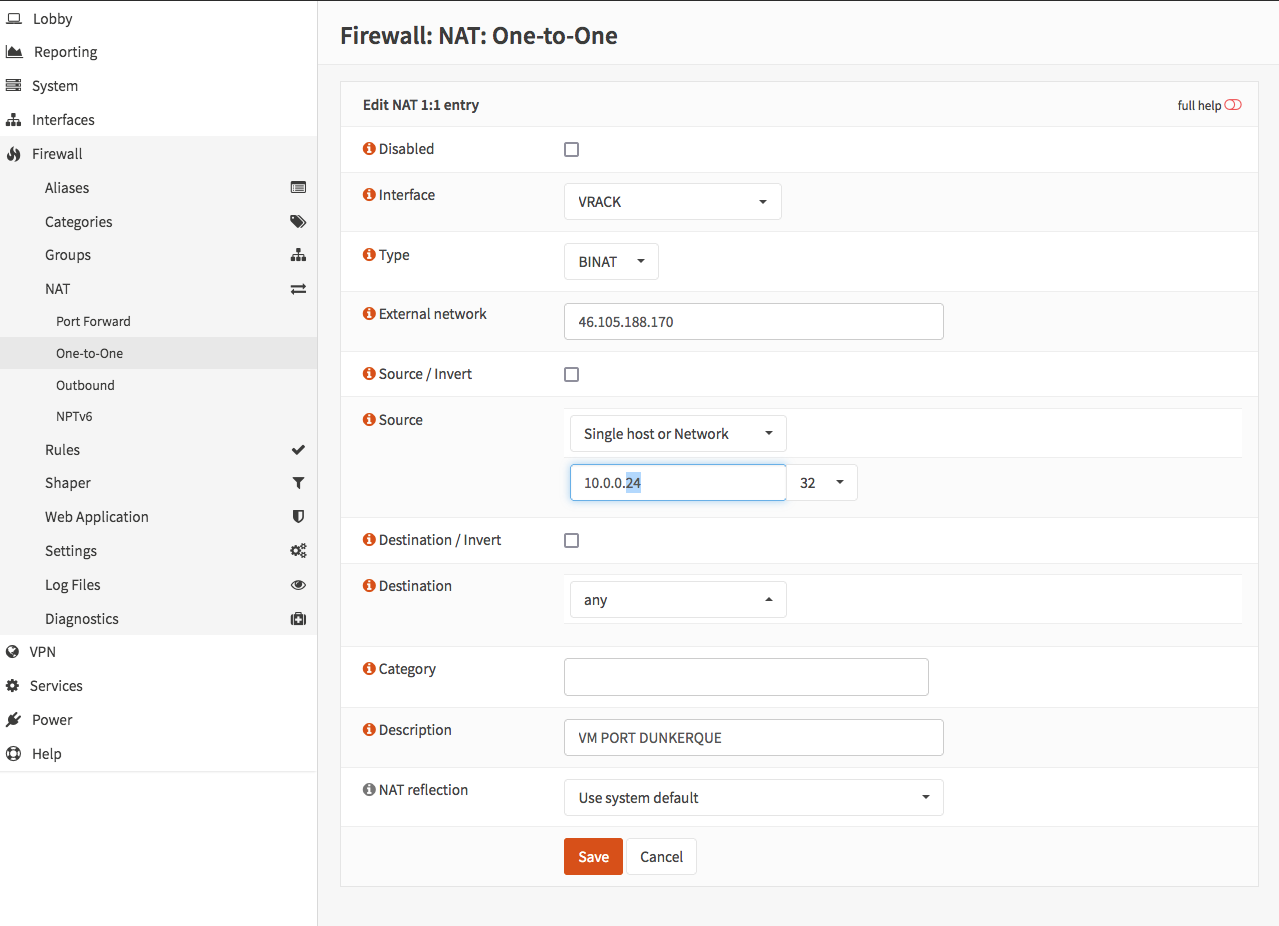
- Soit aller dans les NAT One-to-One (1:1) d'OPNSENSE, et changer l'IP du client vers 10.0.0.32 (sur la correspondance IP externe client <-> IP interne client de la page)
Lors d'une mise en production, pour éviter faire changer aux clients le DNS tout de suite et pour garder un débrayage facile : depuis le pare-feu OPNSense -> firewall -> NAT -> one-to-one, on fait pointer l'IP initiale de la VM vers 10.0.0.32.
Dans l'exemple pour PORT DUNKERQUE, ça voudrait dire faire pointer 46.105.188.170 sur 10.0.0.32 au lieu de 10.0.0.24.
Voir la copie d'écran de OPNSense : media:Nat.png
Arrêter le WAF
[modifier | modifier le wikicode]En cas de problème avec une VM client (un blocage, ralentissement, faux positifs, etc.)
- Modifier les configuration apache en décommentant
#RewriteRule .* /403.html [R,L]
et en remettant les règles pour les logs (commenter la section et décommenter l'autre) :
       # Configuration des logs pour suivi par IP utilisateurs
        #RemoteIPHeader X-Forwarded-For
        #LogFormat "%a %l %u %t \"%r\" %>s %b \"%{Referer}i\" \"%{User-Agent}i\"" forwarded

        #ErrorLog /var/log/apache2/chercher-archives.lamayenne.fr.errors.log
        #CustomLog /var/log/apache2/chercher-archives.lamayenne.fr.log forwarded
        # Fin configuration des logs pour suivi par IP utilisateurs


        #### Configuration log hors WAF
        ErrorLog /var/log/apache2/archives.lamayenne.fr.errors.log
        CustomLog /var/log/apache2/archives.lamayenne.fr.log combined
        #### Fin configuration log hors WAF
- Remettre l'IP interne du client (et pas celle du HAPROXY) dans le NAT 1:1 d'OPNSENSE.
- Ou bien, éteindre les deux machines VM modsec-spoe (Proxmox Saturne) pour désactiver le WAF de force.
Faux positifs
[modifier | modifier le wikicode]On parle de "faux positif " lorsque un paquet anodin (ne constituant aucune menace réelle) est détecté comme tentative d'intrusion.
On parle de "faux négatif" lorsqu'une tentative d'intrusion n'est pas détectée.
Gestion d'un faux positif Coraza (OWASP CRS) sur Archives de la Mayenne
[modifier | modifier le wikicode]Contexte
[modifier | modifier le wikicode]L'application Archives de la Mayenne (Drupal + Pleade/Lucene) générait une erreur HTTP 403 sur certaines recherches contenant :
Saint-Vénérand (Laval)
Le WAF Coraza détectait à tort une tentative d'injection SQL car la chaîne :
Vénérand (
contient le motif :
rand (
qui correspond à une signature SQL de la règle OWASP CRS 942151.
Identification du faux positif
[modifier | modifier le wikicode]Recherche dans les logs Coraza :
tail -f /var/log/coraza-spoa/coraza-agent.log
Extrait du log :
{
  "rule_id":942151,
  "msg":"SQL Injection Attack: SQL function name detected",
  "data":"Matched Data: rand ( found within ARGS:fquery1: Saint-Vénérand (Laval)"
}
La règle responsable est :
942151 - SQL Injection Attack: SQL function name detected
Localisation de la configuration Coraza
[modifier | modifier le wikicode]Service :
systemctl status coraza-spoa
Configuration principale :
/etc/coraza-spoa/config.yaml
Extrait :
Include /etc/coraza-spoa/custom-rules/*.conf
Le fichier de règles est généré automatiquement par Ansible :
/etc/coraza-spoa/custom-rules/900-runtime-overrides.conf
Localisation de la source Ansible
[modifier | modifier le wikicode]Recherche de la variable :
grep -R "coraza_spoa_custom_rules_request_body_exclusions" -n .
Résultat :
roles/coraza/templates/custom-rules.conf.j2
inventory/group_vars/ajlsm_loadbalancer/coraza.yml
Template générateur :
roles/coraza/templates/custom-rules.conf.j2
Variables du groupe load balancer :
inventory/group_vars/ajlsm_loadbalancer/coraza.yml
Vérification de la prise en compte de la variable
[modifier | modifier le wikicode]Contrôle de la variable vue par Ansible :
ansible -i inventory haproxy01.ajlsm.lan \
  -m debug \
  -a 'var=coraza_spoa_custom_rules_request_body_exclusions'
La nouvelle règle doit apparaître dans la sortie.
Ajout de l'exception
[modifier | modifier le wikicode]Modification du fichier :
inventory/group_vars/ajlsm_loadbalancer/coraza.yml
Ajout dans la section :
coraza_spoa_custom_rules_request_body_exclusions:
Règle finale retenue :
  - id: 123471
    variable: "REQUEST_FILENAME"
    operator: "@rx"
    pattern: "^/(archives-en-ligne|pleade)/.*results(\\.html|\\.ajax-html)$"
    actions: "nolog,pass,ctl:ruleRemoveTargetById=942151;ARGS:/^(?:query[0-9]+|fquery[0-9]+)$/"
Cette règle :
- s'applique aux pages de résultats Pleade ;
- couvre les pages HTML classiques et les appels AJAX ;
- retire la règle CRS 942151 ;
- uniquement pour le paramètre ARGS:fquery1 ;
- conserve toutes les autres protections CRS.
Exemples d'URLs couvertes :
/archives-en-ligne/custom-results.html
/archives-en-ligne/results.html
/archives-en-ligne/functions/ead/custom-results.ajax-html
/pleade/custom-results.html
/pleade/functions/ead/custom-results.ajax-html
Ainsi que les motifs suivants :
ARGS:query1
ARGS:query2
ARGS:query3
ARGS:fquery1
ARGS:fquery2
Vérification du rendu du template
[modifier | modifier le wikicode]Simulation du déploiement :
ansible-playbook \
  -i inventory \
  ./plays/deploy.coraza.yml \
  --limit haproxy01.ajlsm.lan \
  --check \
  --diff
Le diff doit montrer :
SecRule REQUEST_FILENAME "@rx ^/(archives-en-ligne|pleade)/.*results(\.html|\.ajax-html)$" \
  "id:123471,phase:1,nolog,pass,ctl:ruleRemoveTargetById=942151;ARGS:/^(?:query[0-9]+|fquery[0-9]+)$/"
Déploiement
[modifier | modifier le wikicode]Attention : le rôle Coraza est indépendant du rôle HAProxy.
Le playbook HAProxy :
plays/deploy.haproxy.yml
ne déploie pas les règles Coraza.
Le playbook Coraza est :
plays/deploy.coraza.yml
Déploiement sur tous les load balancers :
ansible-playbook \
  -i inventory \
  ./plays/deploy.coraza.yml \
  --limit ajlsm_loadbalancer \
  --diff
Déploiement uniquement sur haproxy01 :
ansible-playbook \
  -i inventory \
  ./plays/deploy.coraza.yml \
  --limit haproxy01.ajlsm.lan \
  --diff
Déploiement uniquement sur haproxy02 :
ansible-playbook \
  -i inventory \
  ./plays/deploy.coraza.yml \
  --limit haproxy02.ajlsm.lan \
  --diff
Vérifications après déploiement
[modifier | modifier le wikicode]Contrôle de la présence de la règle :
grep -R "123471\|942151" /etc/coraza-spoa/custom-rules -n
Résultat attendu :
/etc/coraza-spoa/custom-rules/900-runtime-overrides.conf:
SecRule REQUEST_FILENAME "@rx ^/(archives-en-ligne|pleade)/.*results(\.html|\.ajax-html)$" \
"id:123471,...ctl:ruleRemoveTargetById=942151;ARGS:fquery1"
Contrôle du service :
systemctl status coraza-spoa
Vérification via Ansible :
ansible -i inventory ajlsm_loadbalancer \
  -m shell \
  -a 'grep -R "123471\|942151" /etc/coraza-spoa/custom-rules -n && systemctl is-active coraza-spoa'
Validation fonctionnelle
[modifier | modifier le wikicode]Tester la recherche :
Saint-Vénérand (Laval)
L'URL principale ne doit plus renvoyer de 403 :
/archives-en-ligne/custom-results.html
Les appels AJAX associés ne doivent plus être bloqués :
/archives-en-ligne/functions/ead/custom-results.ajax-html
Les logs Coraza ne doivent plus contenir de déclenchement de la règle 942151 pour le paramètre :
ARGS:fquery1
Points importants
[modifier | modifier le wikicode]- Les règles Coraza sont gérées par Ansible.
- Toute modification manuelle dans /etc/coraza-spoa/custom-rules/ sera écrasée lors d'un prochain déploiement.
- La source de vérité est :
inventory/group_vars/ajlsm_loadbalancer/coraza.yml
- Les déploiements de configuration HAProxy et Coraza sont indépendants.
- Une modification des règles Coraza nécessite l'exécution du playbook :
plays/deploy.coraza.yml
Sur le poste local, dans le répertoire ansible-ajlsm, lancez :
ansible-playbook -i inventory ./plays/deploy.coraza.yml --limit ajlsm_loadbalancer --diff
ansible-playbook -i inventory ./plays/deploy.coraza.yml --limit ajlsm_loadbalancer --diff

PLAY [Deploy Coraza SPOA WAF] ***************************************************************************************************************************

TASK [Gathering Facts] **********************************************************************************************************************************
[WARNING]: Host 'haproxy02.ajlsm.lan' is using the discovered Python interpreter at '/usr/bin/python3.10', but future installation of another Python interpreter could cause a different interpreter to be discovered. See https://docs.ansible.com/ansible-core/2.20/reference_appendices/interpreter_discovery.html for more information.
ok: [haproxy02.ajlsm.lan]
[WARNING]: Host 'haproxy01.ajlsm.lan' is using the discovered Python interpreter at '/usr/bin/python3.10', but future installation of another Python interpreter could cause a different interpreter to be discovered. See https://docs.ansible.com/ansible-core/2.20/reference_appendices/interpreter_discovery.html for more information.
ok: [haproxy01.ajlsm.lan]

TASK [coraza : Install build dependencies] **************************************************************************************************************
ok: [haproxy02.ajlsm.lan]
ok: [haproxy01.ajlsm.lan]

TASK [coraza : Install Go via snap] *********************************************************************************************************************
ok: [haproxy01.ajlsm.lan]
ok: [haproxy02.ajlsm.lan]

TASK [coraza : Create build directory] ******************************************************************************************************************
ok: [haproxy02.ajlsm.lan]
ok: [haproxy01.ajlsm.lan]

TASK [coraza : Clone coraza-spoa repository] ************************************************************************************************************
ok: [haproxy02.ajlsm.lan]
ok: [haproxy01.ajlsm.lan]

TASK [coraza : Check if coraza-spoa binary already exists] **********************************************************************************************
ok: [haproxy02.ajlsm.lan]
ok: [haproxy01.ajlsm.lan]

TASK [coraza : Build coraza-spoa] ***********************************************************************************************************************
skipping: [haproxy01.ajlsm.lan]
skipping: [haproxy02.ajlsm.lan]

TASK [coraza : Install coraza-spoa binary] **************************************************************************************************************
skipping: [haproxy01.ajlsm.lan]
skipping: [haproxy02.ajlsm.lan]

TASK [coraza : Create coraza-spoa group] ****************************************************************************************************************
ok: [haproxy02.ajlsm.lan]
ok: [haproxy01.ajlsm.lan]

TASK [coraza : Create coraza-spoa user] *****************************************************************************************************************
ok: [haproxy01.ajlsm.lan]
ok: [haproxy02.ajlsm.lan]

TASK [coraza : Create configuration directory] **********************************************************************************************************
ok: [haproxy02.ajlsm.lan]
ok: [haproxy01.ajlsm.lan]

TASK [coraza : Create log directories] ******************************************************************************************************************
ok: [haproxy01.ajlsm.lan] => (item=/var/log/coraza-spoa)
ok: [haproxy02.ajlsm.lan] => (item=/var/log/coraza-spoa)
ok: [haproxy02.ajlsm.lan] => (item=/var/log/coraza-spoa/audit)
ok: [haproxy01.ajlsm.lan] => (item=/var/log/coraza-spoa/audit)

TASK [coraza : Create log files] ************************************************************************************************************************
ok: [haproxy02.ajlsm.lan] => (item=server.log)
ok: [haproxy01.ajlsm.lan] => (item=server.log)
ok: [haproxy01.ajlsm.lan] => (item=error.log)
ok: [haproxy02.ajlsm.lan] => (item=error.log)
ok: [haproxy01.ajlsm.lan] => (item=audit.log)
ok: [haproxy02.ajlsm.lan] => (item=audit.log)
ok: [haproxy01.ajlsm.lan] => (item=debug.log)
ok: [haproxy02.ajlsm.lan] => (item=debug.log)
ok: [haproxy01.ajlsm.lan] => (item=coraza-agent.log)
ok: [haproxy02.ajlsm.lan] => (item=coraza-agent.log)

TASK [coraza : Create rollback backup directory] ********************************************************************************************************
ok: [haproxy02.ajlsm.lan]
ok: [haproxy01.ajlsm.lan]

TASK [coraza : Deploy coraza.cfg for HAProxy] ***********************************************************************************************************
ok: [haproxy02.ajlsm.lan]
ok: [haproxy01.ajlsm.lan]

TASK [coraza : Check if current coraza-spoa config exists] **********************************************************************************************
ok: [haproxy02.ajlsm.lan]
ok: [haproxy01.ajlsm.lan]

TASK [coraza : Check if current custom rules file exists] ***********************************************************************************************
ok: [haproxy02.ajlsm.lan]
ok: [haproxy01.ajlsm.lan]

TASK [coraza : Backup current coraza-spoa config] *******************************************************************************************************
ok: [haproxy02.ajlsm.lan]
ok: [haproxy01.ajlsm.lan]

TASK [coraza : Backup current custom rules file] ********************************************************************************************************
changed: [haproxy01.ajlsm.lan]
changed: [haproxy02.ajlsm.lan]

TASK [coraza : Deploy coraza-spoa config.yaml] **********************************************************************************************************
ok: [haproxy02.ajlsm.lan]
ok: [haproxy01.ajlsm.lan]

TASK [coraza : Create custom rules directory] ***********************************************************************************************************
ok: [haproxy02.ajlsm.lan]
ok: [haproxy01.ajlsm.lan]

TASK [coraza : Deploy custom rules] *********************************************************************************************************************
--- before: /etc/coraza-spoa/custom-rules/900-runtime-overrides.conf
+++ after: /Users/jlarvers/.ansible/tmp/ansible-local-20994a3e3jiy7/tmp2vqgd1ck/custom-rules.conf.j2
@@ -47,7 +47,7 @@
 SecRule REQUEST_FILENAME "@rx /full_html?" \
   "id:123470,phase:1,nolog,pass,ctl:requestBodyAccess=Off"
 SecRule REQUEST_FILENAME "@rx ^/(archives-en-ligne|pleade)/.*results(\.html|\.ajax-html)$" \
-  "id:123471,phase:1,nolog,pass,ctl:ruleRemoveTargetById=942151;ARGS:fquery1"
+  "id:123471,phase:1,nolog,pass,ctl:ruleRemoveTargetById=942151;ARGS:/^(?:query[0-9]+|fquery[0-9]+)$/"

 SecRequestBodyLimit 524288000
 SecRequestBodyNoFilesLimit 524288000

changed: [haproxy02.ajlsm.lan]
--- before: /etc/coraza-spoa/custom-rules/900-runtime-overrides.conf
+++ after: /Users/jlarvers/.ansible/tmp/ansible-local-20994a3e3jiy7/tmpd0a58h10/custom-rules.conf.j2
@@ -47,7 +47,7 @@
 SecRule REQUEST_FILENAME "@rx /full_html?" \
   "id:123470,phase:1,nolog,pass,ctl:requestBodyAccess=Off"
 SecRule REQUEST_FILENAME "@rx ^/(archives-en-ligne|pleade)/.*results(\.html|\.ajax-html)$" \
-  "id:123471,phase:1,nolog,pass,ctl:ruleRemoveTargetById=942151;ARGS:fquery1"
+  "id:123471,phase:1,nolog,pass,ctl:ruleRemoveTargetById=942151;ARGS:/^(?:query[0-9]+|fquery[0-9]+)$/"

 SecRequestBodyLimit 524288000
 SecRequestBodyNoFilesLimit 524288000

changed: [haproxy01.ajlsm.lan]

TASK [coraza : Remove legacy split custom rules files] **************************************************************************************************
ok: [haproxy01.ajlsm.lan] => (item=900-legacy-overrides.conf)
ok: [haproxy02.ajlsm.lan] => (item=900-legacy-overrides.conf)
ok: [haproxy01.ajlsm.lan] => (item=900-exclusions.conf)
ok: [haproxy02.ajlsm.lan] => (item=900-exclusions.conf)
ok: [haproxy01.ajlsm.lan] => (item=910-crs-policy.conf)
ok: [haproxy02.ajlsm.lan] => (item=910-crs-policy.conf)
ok: [haproxy01.ajlsm.lan] => (item=920-body-limits.conf)
ok: [haproxy02.ajlsm.lan] => (item=920-body-limits.conf)

TASK [coraza : Validate coraza-spoa config and custom rules before restart] *****************************************************************************
ok: [haproxy02.ajlsm.lan]
ok: [haproxy01.ajlsm.lan]

TASK [coraza : Deploy coraza-spoa systemd unit] *********************************************************************************************************
ok: [haproxy02.ajlsm.lan]
ok: [haproxy01.ajlsm.lan]

TASK [coraza : Enable and start coraza-spoa service] ****************************************************************************************************
ok: [haproxy01.ajlsm.lan]
ok: [haproxy02.ajlsm.lan]

RUNNING HANDLER [coraza : Restart coraza-spoa] **********************************************************************************************************
changed: [haproxy01.ajlsm.lan]
changed: [haproxy02.ajlsm.lan]

PLAY RECAP **********************************************************************************************************************************************
haproxy01.ajlsm.lan        : ok=25   changed=3    unreachable=0    failed=0    skipped=2    rescued=0    ignored=0
haproxy02.ajlsm.lan        : ok=25   changed=3    unreachable=0    failed=0    skipped=2    rescued=0    ignored=0
Les paramètres suivants puvent être utilisés avec ansible :
| Option | Description | Modifie le serveur | Affiche les différences | Usage typique |
|---|---|---|---|---|
| aucune option | Exécution normale du playbook | Oui | Non | Déploiement standard |
| --check | Simulation (dry-run) | Non | Non | Vérifier ce qui serait modifié |
| --diff | Exécution réelle avec affichage des différences | Oui | Oui | Déployer en visualisant les changements |
| --check --diff | Simulation avec affichage des différences | Non | Oui | Vérifier précisément les modifications avant déploiement |
| --limit <hôte> | Limite l'exécution à un ou plusieurs hôtes | Selon les autres options | Selon les autres options | Tester sur un seul serveur |
| --tags <tag> | Exécute uniquement les tâches portant un tag donné | Selon les autres options | Selon les autres options | Déployer uniquement un composant spécifique |
| --skip-tags <tag> | Ignore les tâches portant un tag donné | Selon les autres options | Selon les autres options | Exclure une partie du playbook |
| -v | Mode verbeux | Selon les autres options | Selon les autres options | Voir davantage d'informations |
| -vv | Mode très verbeux | Selon les autres options | Selon les autres options | Débogage |
| -vvv | Mode débogage avancé | Selon les autres options | Selon les autres options | Analyse détaillée des connexions et modules |